Import
ImportModule renders a CSV upload form, server-side preview, optional column mapping, and opt-in queued execution. Adminix reads the uploaded CSV, renders preview rows, preselects configured mappings, and can dispatch a queued handler after a clean preview. It never lets the browser choose target fields, validation rules, datasource, or persistence behavior.
Rendered behavior
The module renders:
a CSRF-protected
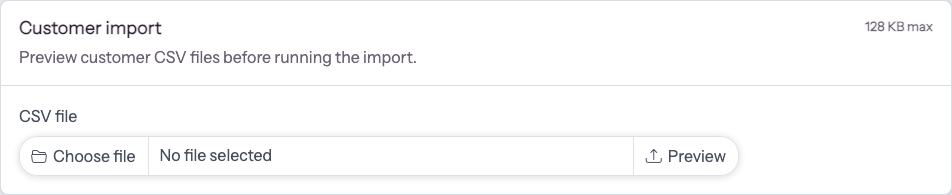
POSTform to the Adminix import preview endpoint;a required real file input named
adminix_import_filethat accepts CSV/text files and is checked by browser preflight before submission;hidden page/module names used only to resolve the configured module server-side;
preview rows after a successful upload;
mapping selects when
ImportColumndefinitions exist; every select belongs to the separate execute form without nesting forms.a server-side row validation report when configured columns are required or declare validation rules.
a failed-row CSV download when preview validation finds invalid rows.
a
Queue importbutton whenqueued()andhandler()are configured and the preview has no missing required columns or validation issues.
Rendered example:
The preview redirect stores parsed preview data in the Laravel session and, only for queued imports, stores a server-owned temporary CSV copy for the later execute request. That preview is bound to the signed panel, tenant, and route-parameter scope; another otherwise valid scope must upload its own preview. Adminix treats browser-submitted mapping as a proposal, not an import contract, and does not write application records during preview. On execute it accepts only configured ImportColumn::field() keys and exact headers from the current server-owned preview, then recomputes missing-required state and preview-row validation before dispatch. Replacing or invalidating a preview deletes its abandoned temporary copy. Queue dispatch transfers the copy to queue ownership with one exclusive marker rename, so duplicate execute requests cannot dispatch the same preview twice. The worker deletes it after success, validation failure, or a controlled context error. If the application handler or another unexpected worker operation throws, the worker leaves both the CSV and its .queued marker in place so Laravel can retry the same job with the same file. Laravel calls the job's terminal failed() hook after attempts are exhausted; that hook deletes the queue-owned CSV and ownership markers. Stale preview cleanup never removes files already owned by a queued job.
Module API
name()is required and must be unique within the page.title()renders the card heading; by default the module name is shown.description()renders short helper text under the title.maxKilobytes()limits accepted preview upload size. The default is2048.previewRows()limits rendered preview rows and is clamped to at least1. The default is10.delimiter()accepts one character and defaults to,.addColumn()andaddColumns()define optional target columns for mapping.handler()configures an import handler class, object, or callable for queued execution.queued()enables theQueue importaction and accepts the success message shown after dispatch.onQueue()andonConnection()set Laravel queue routing for the queued import job.progressTrigger()starts a same-pageProgressBarModulewhen the clean preview is queued.
ImportColumn supports:
field()- stable target field key;label()- visible target label;aliases()- header aliases for automatic matching;required()/optional()- whether a missing header match should be highlighted and mapped preview values must be present;rules()- Laravel validation rules applied to mapped preview values server-side.
Automatic header matching is Unicode-aware, case-insensitive, and ignores punctuation while preserving letters and numbers. Thus email, E-mail, and Email Address can match the same configured target when aliases are declared, and labels or aliases such as Фамилия and Имя match their Cyrillic headers independently. Empty and punctuation-only normalized tokens never match.
Row validation report
Import preview validates only the rendered preview rows. Adminix builds validation data from the server-resolved ImportModule, resolved header mapping, and parsed CSV rows. The browser cannot submit validation rules or choose target fields.
Result: after upload, Adminix renders a compact validation summary. If issues are found, the report lists CSV row number, target column, submitted value, and Laravel validation message. The preview report checks only preview rows; queued execution reparses the full server-owned temporary CSV and validates every row again before calling the handler. Changing a mapping select submits the exact selected preview header. The execute endpoint rebuilds mapped preview rows and validation from the configured columns before queueing, so a required column without an automatic match can be completed through the UI. Unknown target fields, arrays/objects in place of a header, and headers absent from the current preview are rejected before dispatch. After any mapping change, the browser blocks submission only while a required mapping is empty. This lets an admin clear or remap an optional column that caused the previous preview validation report; the execute endpoint remains authoritative and must accept the recomputed mapping and row validation before dispatch.
When preview validation has invalid rows, Adminix renders Download failed rows. The download endpoint verifies the signed import context and current preview session, then returns a CSV containing only failed preview rows. The CSV includes _adminix_csv_row, _adminix_failed_fields, _adminix_errors, and the original CSV columns. The browser cannot submit failed row data, validation messages, or a temporary file path. Formula-like text cells are neutralized in this download before CSV serialization, while numeric signed values remain numeric.
Queued execution
Queued import execution is opt-in. Configure both queued() and handler(). The execute form is rendered only after preview and is disabled until required mappings and preview validation pass.
ImportRequest::rows() contains mapped rows keyed by configured ImportColumn::field() values. rawRows(), headers(), mappings(), params(), filename(), and validation() expose the server-derived context for application services. executionId() returns the server-generated UUID for this queued import and remains stable across serialization and redelivery of the job. If full-file validation fails, Adminix returns ImportResult::validation(...) from the job and does not call the handler. Preview failed-row downloads are available before queueing. Invalid signed context, stale or incompatible module configuration, missing/non-callable handlers, mapping problems, and row validation failures are controlled results and clean the queue-owned file without retrying. Unexpected handler/container/runtime exceptions escape unchanged to Laravel. The source CSV and .queued marker remain available across those retry attempts; success or a controlled result cleans them immediately, and terminal failed() cleanup removes them after Laravel gives up.
For authenticated panels, dispatch records only the selected guard name and the actor's scalar authentication identifier. The worker reloads that actor from the guard's current provider, requires AdminixUserInterface, rechecks the current admin criteria, and only then restores tenant context and resolves the current visible ImportModule. Missing, malformed, deleted, or revoked actor context returns a controlled error without calling the import handler. Panels with no_auth_access continue to support actorless local/demo imports.
When the selected connection, or queue.default, uses Laravel's sync driver, Adminix executes the same authorized job path inline and maps its actual ImportResult back to the existing success, error, or validation redirect. Controlled results clean the queue-owned file and clear the preview session. If an unexpected inline exception occurs, Adminix reports it once as an HTTP error and restores preview ownership so the administrator can retry; the handler is not invoked a second time. Asynchronous connections keep the immediate queued() acknowledgement and Laravel retry/file-ownership behavior described above. The original import job passes through Laravel's selected queue connection, including payload hooks, serialization, queue lifecycle events, attempts, and effective after_commit behavior. When after_commit is enabled and a database transaction is already open, Adminix returns the queued() acknowledgement and clears the preview session because the worker result is not available yet. Commit runs the deferred import and performs normal worker cleanup. Rollback discards the deferred job and deletes the queue-owned CSV and marker instead of restoring an inaccessible preview whose session ownership has already been cleared. With no pending transaction, the sync connection still returns the actual ImportResult inline.
Call progressTrigger('import-progress') to start an existing same-page ProgressBarModule when the Queue import button is clicked. The progress handler remains application-owned: store queued job state in the consuming app and return it from ProgressBarHandlerInterface. The browser trigger only starts polling; it does not make progress data client-authoritative. When the worker finishes, persist a terminal state that the handler can return as ProgressBarResult::completed(), ProgressBarResult::failed($reason, $percent, $label), or ProgressBarResult::cancelled($reason, $percent, $label). Do not collapse failed imports into inactive() if admins need to see the failure on the still-open page; failed and cancelled progress results render as errors and stop polling without pretending the import reached 100%.
Queued workers cannot return an HTTP download response to the original browser request, so generated results are represented as typed metadata:
downloadResult(), reportResult(), and toArray() expose this metadata for application-owned job storage, notifications, or progress handlers. The consuming app owns the generated file/report, authorization, signed URL, retention, and audit rules.
For safe queue usage, make import handlers idempotent. Before writing business data, persist an application import receipt with a unique constraint on $request->executionId(). On redelivery, return the stored result instead of repeating completed rows or external calls. Record processed/failed counters from the queue worker and let the progress handler read those counters only. Adminix provides a stable key but cannot atomically deduplicate application-owned transactions or external APIs. Do not rely on the preview session after dispatch; the queued job receives the server-owned CSV copy and reparses it. The job also receives the server-resolved panel key and active tenant criteria snapshot. The worker restores those scopes without trusting a browser panel key, request query, or session value. If a job is retried, the handler should detect rows or batches that were already applied and avoid duplicate writes. Configure Laravel queue tries/backoff for transient application failures; returning ImportResult::error() is a controlled terminal result, while throwing asks Laravel to retry.
Every attempt dispatches a best-effort QueuedExecutionStarted event. QueuedExecutionFinished follows only when that attempt returns success or a controlled validation/error result. A retryable exception has no normal finished event: it escapes to Laravel, the next delivery emits another started event with the same execution ID, and the terminal failed() callback emits one sanitized failed finish after retries are exhausted. The QueuedExecutionEventDto contains execution/panel/module identity, attempt, lifecycle/result status, actor type/ID, and issue count. It never contains CSV rows, mapped/raw values, filenames, temporary paths, signed contexts, handler result messages, or credentials. Listener failures are ignored so they cannot turn a completed import into a retry.
Restart long-lived Laravel queue workers during an Adminix upgrade so they load the new authorized import job and its actor-aware parent together. Jobs queued before the upgrade do not contain an actor snapshot and fail closed on authenticated panels; upload a fresh preview and redispatch those imports after deployment.
Security
The preview endpoint resolves the page and module through Adminix server-side configuration. It accepts CSV or text extensions only within the configured size limit, verifies the server-detected MIME type and rejects binary control content before parsing the file. The browser cannot choose datasource, writable fields, validation rules, or persistence behavior.
The failed-row download endpoint verifies the same signed import context and exports only rows from the server-owned preview validation report. The execute endpoint verifies a signed import context, requires an existing server-owned preview session, and dispatches RunAuthorizedQueuedImport. The job receives only the server-normalized field-to-header mapping, never browser-owned column definitions or validation rules. It resolves the current ImportModule, reparses the temporary CSV, verifies the selected headers against the actual file headers, validates all rows, and then calls the configured handler. Jobs and legacy execute clients without a mapping payload keep automatic mapping behavior. Queued result metadata is returned by the server-side handler; Adminix does not accept result URLs or report bodies from the browser. Application handlers own database writes, idempotency, authorization beyond Adminix access, failed-row storage, and audit rules.
Adminix creates a new temporary-import directory with mode 02770: group read/write/execute plus setgid, so files inherit the directory group. CSV and ownership-marker files use mode 0660. When the web process and queue worker use different operating-system users, make both users members of one runtime group and provision the directory with that group before enabling queued imports. For example, from the Laravel application root:
The package does not call chgrp() because the consuming application owns operating-system group policy. Existing directories keep their administrator-defined owner, group, and permissions; verify that the shared group can traverse the parent directories and read, rename, and delete files in the import directory.
Doctor
php artisan adminix:doctor validates import column configuration:
ADMINIX_IMPORT_COLUMNS_INVALIDfor non-array or non-ImportColumncolumn values;ADMINIX_IMPORT_COLUMN_FIELD_MISSINGfor empty target fields;ADMINIX_IMPORT_COLUMN_FIELD_DUPLICATEfor duplicate target fields in one module;ADMINIX_IMPORT_COLUMN_RULE_INVALIDfor invalid row validation rule values;ADMINIX_IMPORT_HANDLER_MISSINGwhen a queued import has no handler;ADMINIX_IMPORT_HANDLER_INVALIDwhen a queued import handler is not a valid class, object, or callable;ADMINIX_IMPORT_PROGRESS_TRIGGER_NOT_FOUNDwhenprogressTrigger()does not match a same-pageProgressBarModule.