Media Browser
MediaBrowserModule renders application-provided media records inside an Adminix page. It is a PHP-first browser surface: the consuming app supplies item names and URLs, and Adminix only renders those trusted records. The module does not expose directory browsing, transform images, or make application authorization decisions.
Grid, dark theme:
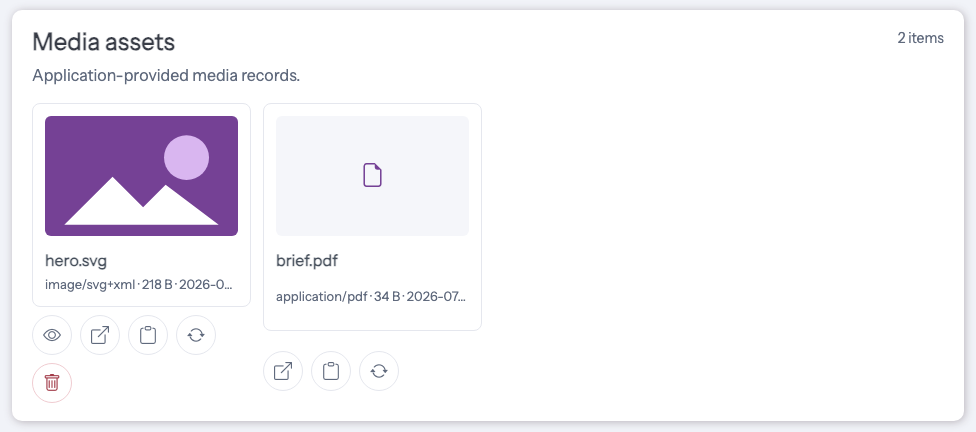
Grid, light theme:
Table, dark theme:
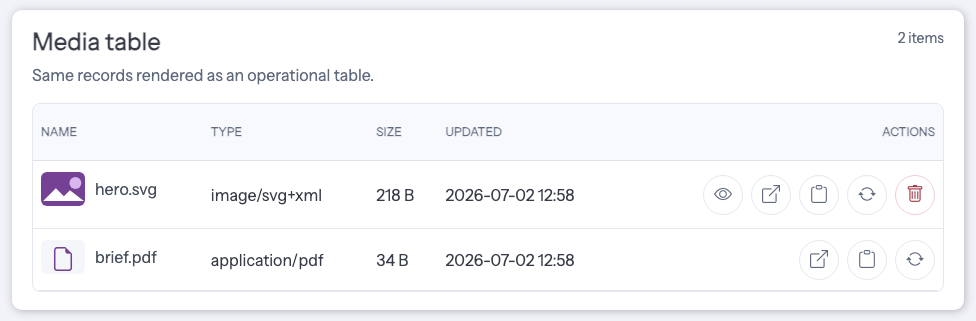
Table, light theme:
Disk-backed media can be scoped to a configured Laravel filesystem disk and relative directory:
Adminix lists files directly inside the configured directory and builds URLs with the configured disk. Nested directories are not scanned by this mode.
Module API
name()is required and must be unique within the page.title()renders the card heading; by default the module name is shown.description()renders short helper text under the heading.addItem()andaddItems()acceptMediaItemobjects or arrays.items()accepts an array or a server-side callable that returns an array.grid()renders card-style image/file tiles and is the default mode.table()renders a compact operational table with name, type, size, updated date, and open action.mode('grid')andmode('table')are accepted when the mode is dynamic.fromDisk($disk, $directory)reads files from a server-configured Laravel Storage disk and a relative scoped directory.disk()anddirectory()can be used separately when the values are assembled in PHP.imageTransformUsing()optionally fills image thumbnail and preview URLs from a server-side callback.emptyMessage()customizes the empty-state message.
MediaItem accepts:
name- visible filename/title;url- application-owned URL opened in a new tab;type-fileorimage;mime,size, andupdated_at- optional display metadata.thumbnail_url- optional transformed image URL used only for thumbnails.preview_url- optional transformed image URL used only inside the preview modal.preview- enables the built-in image preview button for image items; enabled by default.copyableorcopy_url- enables the copy URL button; enabled by default.replace- optional app-owned upload form action metadata.remove- optional app-owned remove form action metadata.
Item Actions
Image items render a preview button by default. The preview opens a Bootstrap modal on the same page and does not call the server again except for loading the item URL as the image source.
Every item renders a copy URL button by default. The browser copies the configured MediaItem::url() value and shows an Adminix notification. Disable either action per item when needed:
Replace and remove actions are optional and must point to application-owned routes. Adminix renders the UI, CSRF token, upload input, confirmation prompt, and method spoofing; the consuming application authorizes the request, validates the file, writes storage, deletes storage, redirects, and flashes notifications.
Array configuration uses the same server-declared shape:
Image Transform Hooks
Adminix does not resize or transform images itself. Use imageTransformUsing() when the consuming application already owns a thumbnail/preview route, signed URL generator, CDN image pipeline, or storage adapter:
The callback receives the resolved MediaItem, the variant name (thumbnail or preview), and the MediaBrowserModule. It must return a URL string or null. The thumbnail URL is used for grid/table <img> sources. The preview URL is used only when opening the image preview modal. Open links, copy URL actions, replace actions, and remove actions keep using the original MediaItem::url().
Item-level thumbnail_url and preview_url values take precedence over the module callback:
Security
Do not expose raw private storage paths as item URLs. Generate URLs through application routes, signed URLs, or storage helpers that enforce authorization and retention. Browser-submitted data is not used to choose disk, directory, item list, or URL strategy. Disk-backed media scopes are server-side configuration only; never copy request values into disk() or directory(). Directory values must be relative storage paths without traversal segments. Image transform callbacks run server-side and must return application-owned URLs. Do not derive transform variants, file paths, tenant IDs, or private object keys from browser input. Replace and remove actions are only rendered from server-side MediaItem metadata. Do not build action URLs, target disks, directories, filenames, owner IDs, or tenant IDs from browser input. Application routes must authorize the current admin and validate uploaded files before replacing or removing storage objects.
URL Strategies
Use fromDisk('public', 'directory') only when the configured filesystem disk is meant to produce public URLs. Adminix uses the disk URL generated by Laravel Storage and does not add extra authorization around those files.
For private media, prefer items() with application-owned URLs:
The target route should authorize the current admin, tenant, owner, and retention policy before streaming or redirecting to the file. Temporary signed URLs are also valid when the consuming app owns expiry, revocation, headers, and audit requirements. Do not render raw filesystem paths, private S3 keys, tenant identifiers, or permanent private object URLs directly in MediaItem::url().
S3-Compatible Storage Examples
For public S3-compatible media, configure the Laravel filesystem disk in the consuming application and let Adminix read only the server-owned disk/directory pair:
Use this shape only when the disk returns public URLs that are safe for admins to open directly.
For private objects, keep the browser module on application-owned URLs:
The admin.media.show route should authorize the current admin, tenant, owner, and object key before streaming the object or redirecting to a temporary URL. For S3-compatible providers such as MinIO, Cloudflare R2, DigitalOcean Spaces, or self-hosted S3 APIs, configure the disk endpoint/path-style settings in Laravel and keep the same Adminix module API. Do not pass bucket names, object keys, endpoint values, or temporary URL expiry values from browser input into MediaItem, fromDisk(), or transform callbacks.
Doctor Checks
adminix:doctor validates static media item arrays for invalid entries, missing names, missing URLs, unsupported item types, unsupported modes, missing disks, unsafe directories, invalid transform URLs, invalid action shapes, missing action URLs, unsupported action methods, and missing replace upload field names. Callable items() providers are not executed during diagnostics; keep their own storage and authorization checks in the application.