Modal new resource
Description
The ModalNewResource module renders a form for creating a record inside a modal.
Format is similar to New resource module. The difference is that ModalNewResource shows a form inside a modal without a page reload, while NewResource renders a separate page.
Open the modal with a ModalTogglerModule configured as the newItemLink() of a ListModule.
Relation managers also use ModalNewResourceModule for child create. In that flow Adminix signs the parent relation context and injects the relation foreign key as a server-owned hidden field, so browser-sent parent ids are ignored.
ModalNewResource configuration
Place a named create modal on the same page as the list that opens it. newItemLink() belongs to ListModule; it receives a ModalTogglerModule whose modalName() matches the modal module name.
Result: the list renders a “New user” control, opens the named modal without a page reload, and submits only fields declared by the server-side module.
Rendered example:
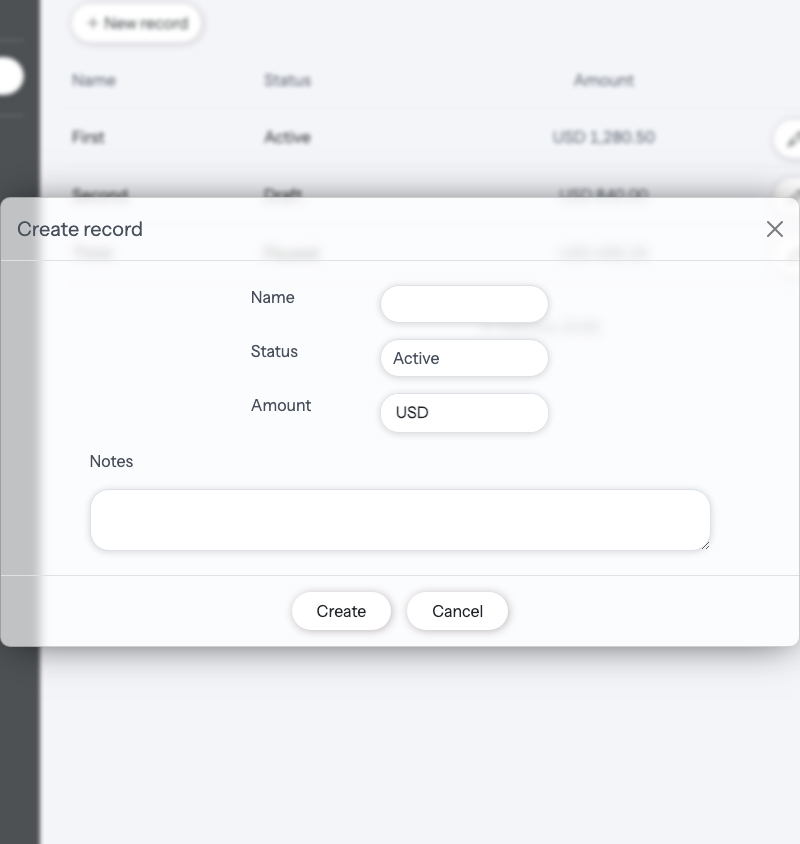
Modal create forms also support ResourceField::upload(). The modal submits multipart FormData, validates files through the server-side field configuration, stores them through Laravel Storage, and persists only the stored path. Invalid mime/size validation returns normal JSON field errors and does not store the uploaded file. See Resource for the full upload API and expected result.
ModalNewResource configuration methods
Method | Description | |
|---|---|---|
name | Name of module, must be unique in current page.
name('new_user_modal')
| Required |
title | Title on the top of module
title('NEW USER')
| Optional |
dataSource | Source of data for new entity creation, can be an
dataSource(\App\Models\User::class)
or
dataSource('users')
| Required |
addField addFields | Methods by which you can add fields for the current Argument can be only
->addField(
ResourceField::name('Name')
->field('name')
->type(ResourceInputTypeEnum::STRING)
->required()
)
| Required |
addFieldValidation | Method by which you can add validation rules for a field in the current Format similar to native Laravel Validation feature. Details described below. #Validation
->addFieldValidation(
'name',
[
'string',
'required',
"unique:". User::class.",name"
]
)
| Optional |
ModalTogglerModule configuration
newItemLink() belongs to ListModule, not AdminixPage. Pass it an AdminixLinkModule for page navigation or a ModalTogglerModule for the create modal shown above.
Fields
Fields is an array, of input fields to be rendered in the Form.
To add field to your NewResource module you need paste AlexKudrya\Adminix\Modules\Resource\ResourceField class instance as an argument to addField or addFields method of ModalNewResourceModule object.
ResourceField::asyncSrc() is supported for modal create SELECT fields. The UI searches remote options through the package async endpoint and preserves the existing modal validation feedback behavior. multiple() renders the same chip-based multi-select inside modals; selected values are backend-validated against the async source and saved as a JSON array string.
ResourceField::upload() is supported for modal create fields too. Use FILE for stored files and an IMAGE field with upload(...) for stored images; validation errors are returned through the existing modal field feedback blocks.
ResourceField::password() is supported for modal create fields. It renders password inputs with an optional visibility toggle and Laravel-compatible field_confirmation naming when confirmed() is enabled. updateOnly() password fields are ignored during creation; immutable() password fields can be created but are not writable on edit forms. See Resource for the full password contract and security notes.
Modal create fields honor both the modal and create visibility contexts. Use hiddenOnModal() to remove a field from every modal form, or hiddenOnCreate() when the field must be unavailable on all create surfaces. Hidden-by-context fields are not rendered and are excluded from the modal API writable whitelist.
ResourceField configuration
Method | Description | |||||||||
|---|---|---|---|---|---|---|---|---|---|---|
name | Title of the libel displayed near to the input
'name' => 'Email',
| Required | ||||||||
type | Type of rendered input, can be provided only by Available types:
type(ResourceInputTypeEnum::EMAIL)
| Required | ||||||||
field | Name of field in database table where new record will be created.
field('role_id')
| Required | ||||||||
required | If enabled - field will be required for form submitting, and form wil not be submitted until this field wil not be filled. By default, is disabled.
required()
| Optional | ||||||||
src | Required for filed with type For example, Example:
ResourceField::name('Role')
->field('role_id')
->type(ResourceInputTypeEnum::SELECT)
->required()
->src(
InputSelectSrc::dataSource(Role::class)
->nameField('name')
->valueField('id')
),
| Optional | ||||||||
addSelectRecords | Required for fields with type Arguments can be only
ResourceField::name('Role')
->field('role_id')
->type(ResourceInputTypeEnum::SELECT)
->addSelectRecords(
SelectRecord::name('Admin')->value(1),
SelectRecord::name('Manager')->value(2),
SelectRecord::name('Seller')->value(3),
SelectRecord::name('Guest')->value(4),
)
| Optional | ||||||||
value | Used only for fields with type
value('some text')
Or you can paste parameter from route, if you provided it. For example
value('param:0')
| Optional | ||||||||
confirmed | Can be used only for fields with type Validation uses Laravel's
confirmed()
| Optional | ||||||||
addValidationRules | Adding validation rules for current field. Password confirmation uses Laravel's Format similar to Laravel native Validation feature. Details here Validation.
->addValidationRules(
'integer',
'required',
'exists:'. Role::class.',id'
),
| Optional |
Validation
An array of validation rules for form input data. Format similar to Laravel native Validation feature.
There are 3 ways to add validation rules to your newResource form:
Add rules to every
ResourceFieldpersonally, by usingaddValidationRules()methodAdd rules to every field by using
addFieldValidation()method ofModalNewResourceModuleobjectAdd all rules for add fields by using
validation()method ofModalNewResourceModuleobject
Way 1 example:
Way 2 example:
Way 3 example: