Audit
AuditPanelModule renders activity events for a server-defined subject. Adminix does not ship persistence for audit rows; consuming applications provide a reader through AuditProviderInterface and can provide a writer through AuditRecorderInterface.
Audit panel
Add the module to an Adminix page:
Result: /adminix/users/15 resolves param:0 to 15, calls the configured provider with User::class and subject id 15, and renders a timeline with actor, action, timestamp, field diff, and metadata. The subject id comes from Adminix page params, not from query strings or hidden browser input.
Rendered example:
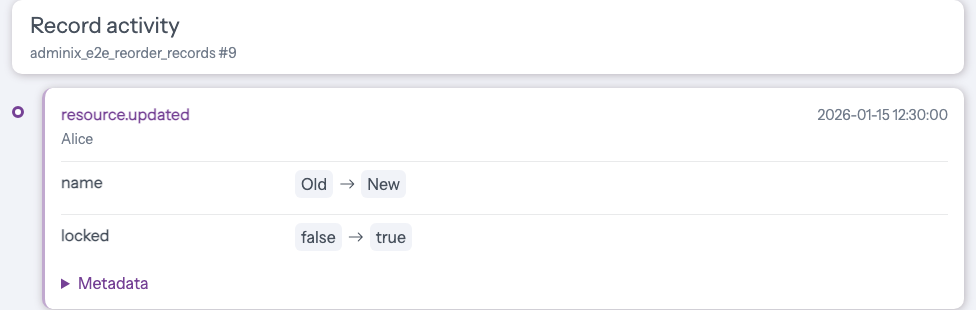
The same AuditPanelModule can also be attached to a DetailModule through auditPanel()/withAuditPanel(). In that case Adminix prepares the detail record first, then prepares the audit panel with the same page params and renders it below the detail card and relation snippets.
provider() accepts:
an
AuditProviderInterfaceinstance;a class string resolved through the Laravel container;
a callable with signature
fn (AuditSubjectDto $subject, AuditPanelModule $module): AuditResultDto|array.
Provider example:
If the provider throws, Adminix renders a controlled warning inside the panel instead of a 500 response.
Audit events
Adminix dispatches package events after successful package flows:
ResourceCreated;ResourceUpdated;ResourceUploadChanged;ResourceRestored;ResourceForceDeleted;ResourceCloned;BulkActionQueued;BulkActionExecuted;CallbackActionExecuted.
Each event exposes auditEvent(): AuditEventDto.
Result: listeners receive a normalized event after the resource update has succeeded. For updates, changes() contains only fields whose submitted writable value differs from the current server-loaded row. For asynchronously queued bulk actions, bulk.queued metadata contains the server-resolved action name, selected ids after list scope filtering, primary key, queue connection/name, success flag, and queued message. When the queued handler later runs, Adminix records the normal bulk.executed event with the handler result. For direct bulk actions and queued actions routed through Laravel's sync driver, bulk.executed metadata contains the server-resolved action name, selected ids after list scope filtering, primary key, success flag, and handler message. Sync-driver execution does not also emit bulk.queued. Exception: a sync connection with effective after_commit inside an open database transaction is deferred, so the request records bulk.queued; after commit the worker records bulk.executed, while rollback never executes it. For callback actions, callback.executed metadata contains the server-resolved callback action name, success flag, handler message, and declared field keys. For list soft-delete actions, resource.restored records the previous deleted_at value and resource.force_deleted records the primary key, action name, and deleted timestamp in metadata. For list clone actions, resource.cloned metadata contains the primary key, source id, created id when available, and copied field names; bulk clone also emits the normal bulk.executed event. For uploads, metadata() contains stored and replaced file descriptors.
Audit recorder
By default Adminix binds a no-op AuditRecorderInterface, so enabling audit events does not require a database table or extra package dependency. Audit logging is best-effort after the business operation. Payload construction, the configured recorder, and framework event dispatch are isolated failure boundaries. A recorder failure does not suppress the framework event, an event-listener failure does not undo a recorder write, and neither failure makes a completed queued handler retry or repeat its business write. Applications should still monitor recorder/listener failures in their own integrations. To persist every emitted audit event, bind your own recorder in the consuming Laravel app:
Result: resource create/update/upload and bulk action flows call your recorder before dispatching the package event. Recorder exceptions are swallowed by Adminix so audit persistence failures do not break the admin write flow; log failures inside your recorder if your application needs operational visibility.
Safety notes
Keep tenant/user ownership in server-side module config and provider queries.
Do not read subject ids, writable fields, selected ids, or datasource names from browser metadata when persisting audit records.
Callback audit metadata lists declared field keys, not browser-forged extra fields; keep field values and external webhook secrets in application-owned audit records only when they are safe to store.
AuditPanelModule::subject(..., 'param:n')resolves only from Adminix page params, including when the panel is attached toDetailModule.Bulk audit selected ids are already filtered through the same list datasource, criteria, filters, search, sorting, lens, and relation scope used by the rendered list.
Upload audit metadata contains file descriptors; do not expose private storage URLs from a provider unless they are safe for the current admin user.