Resource
Description
The Resource module renders a form for editing an existing record.
Format is very similar to New resource module. The difference is that Resource edits an existing record, while NewResource creates a record.
Use ResourceModule when an admin page must edit an existing record: it renders writable fields, validates submitted data, stores uploads, redirects after save, and records package audit events. Use Detail instead when the page should only present one record with read-only fields, sections, tabs, relation snippets, or an attached audit panel. ResourceModule::readonly() is useful for temporarily locking a form, but it is still an edit-form surface; it is not a replacement for a polished detail page.
Resource configuration
Add a named ResourceModule to an AdminixPage. The module selects the existing record with server-declared properties; the first route-tail value is param:0.
Open /adminix/users-edit/15 to edit user 15. The page module, datasource, writable fields, and record criterion come from this server-side provider; the browser does not choose them.
Resource configuration methods
Method | Description | |
|---|---|---|
name | Name of module, must be unique in current page.
name('user')
| Required |
title | Title on the top of module
title('USER')
| Optional |
addProp addProps | An array of fields for properties in url to select the desired record from the database. For example: The url is - An argument can be only
->addProp(
ResourceProperty::key('id')->value('param:0')
)
or
->addProps(
ResourceProperty::key('id')->value('param:0'),
ResourceProperty::key('is_admin')->value(false),
)
| Optional |
dataSource | Source of the existing entity, can be an
dataSource(\App\Models\User::class)
or
dataSource('users')
| Required |
addField addFields | Methods by which you can add fields for the current Argument can be only
->addField(
ResourceField::name('Name')
->field('name')
->type(ResourceInputTypeEnum::STRING)
->required()
)
| Required |
addFieldValidation | Method by which you can add validation rules for a field in the current Format similar to native Laravel Validation feature. Details described below. #Validation
->addFieldValidation(
'name',
[
'string',
'required'
]
)
For updates, declare the same connection-neutral model rule, for example | Optional |
readonly | All fields become not editable, render not
readonly()
| Optional |
successRedirectUri | An Adminix page URI to redirect to after a successful record update.
successRedirectUri(UsersPage::URI)
| Optional |
Relation managers
RelationManager attaches a related list to an existing ResourceModule. The current MVP supports Eloquent hasOne and hasMany relations. The parent record is resolved by the resource module first, using server-side props() and param:* route context. The child list then receives a server-side relation criterion for the parent key.
Result: after the resource form Adminix renders a Posts section using the normal ListModule table component. Search, filters, sorting, pagination, table responsive behavior, CSV export, and UI-only Table UX controls continue to use the child list name, for example user-posts. The browser cannot select a different parent id for the relation list. If a browser filter targets the relation foreign key, it can only narrow the already server-scoped child query.
canCreate() renders a relation-scoped ModalNewResourceModule. Adminix derives the child datasource from the Eloquent relation and injects the relation foreign key as a hidden server-owned field. If the browser sends a different foreign key value, Adminix ignores it and uses the signed parent relation context.
canEdit() renders a relation-scoped ModalResourceModule and appends a normal ModalTogglerModule row action to the child list. The modal fetch and save APIs use the signed parent relation context and add the relation foreign-key criterion to the child update. If a child record exists but belongs to another parent, the API returns a controlled not-found response instead of updating it.
Generated relation modal names use the child list name plus the action suffix:
You may pass a custom modal module to canCreate($modal) or canEdit($modal) when the generated fields are not enough. Adminix still owns the relation foreign-key field and parent criteria.
Result: the relation section shows a Create button, empty child lists show No records found., and modal validation errors render in the normal field feedback blocks.
Fields
Fields is an array, of input fields to be rendered in the Form.
Field Visibility Contexts
Use field visibility contexts when the same field configuration should be reused across create, edit, modal, and detail surfaces without making the field browser-writable everywhere. ResourceField supports:
visibleOnCreate()/hiddenOnCreate();visibleOnUpdate()/hiddenOnUpdate();visibleOnModal()/hiddenOnModal();visibleOnDetail()/hiddenOnDetail();generic
visibleOn(...),hiddenOn(...), andhideOn(...)withFieldVisibilityContextEnumor context strings.
Default fields are visible in every applicable context. visibleOn*() creates an allow-list; the field renders when any active context matches. Modal create uses both modal and create; modal edit uses both modal and update. hiddenOn*() always wins over visibleOn*().
Hidden-by-context fields are removed from rendered inputs, signed hidden-field context, writable field resolution, and validation whitelists. Do not use visibility contexts as a replacement for authorization or tenant scoping; keep sensitive ownership criteria server-side.
Field Presentation
ResourceField presentation helpers work in ResourceModule, NewResourceModule, ModalResourceModule, ModalNewResourceModule, and DetailModule when a resource field is reused for read-only display. They are server-rendered UI hints only; they do not make fields writable, hidden, validated, or authorized.
Available helpers:
placeholder($text)sets the input placeholder for text-like controls and async select search;help($text)renders escaped helper text below form controls and in detail fields;width('narrow'|'medium'|'wide'|'full')controls the form column width; aliases such assm,md,lg,xl,full-width, and100are normalized;narrowWidth(),mediumWidth(),wideWidth(), andfullWidth()are named width shortcuts;alignment('start'|'center'|'end')controls visual text alignment;left,middle, andrightare normalized aliases;alignStart(),alignCenter(), andalignEnd()are named alignment shortcuts.
Invalid width/alignment values are ignored instead of rendered as custom CSS classes. Use these helpers for presentation only; continue using visibility contexts, validation, readonly flags, and server-side module configuration for behavior and security.
Badge / Status Field
Use ResourceField::status() when an edit page should display a server-owned state without letting the browser submit it. ResourceInputTypeEnum::BADGE renders a badge, does not render an input with the field name, marks the field readonly, and is excluded from writable field resolution.
Use badge('#754195') for a single-color badge, or badgeMap() for explicit value labels and colors. If the page must allow status transitions, use a normal writable SELECT field or a server-side action instead of BADGE.
Money / Currency Field
Use ResourceField::money($currency = 'USD', $decimals = 2) for writable amount fields. ResourceInputTypeEnum::MONEY renders a number input with a currency prefix and a decimal step derived from $decimals. The field remains a normal server-declared writable resource field. Across supported database drivers, a stored value such as 1234.5 is rendered as 1234.50 when two decimals are configured. This string padding does not cast through float, round extra precision, or change persistence semantics.
Use Laravel validation rules such as numeric, decimal:0,2, min, or max when the consuming app needs stricter amount validation.
Color Field
Use ResourceField::color() for writable color values. It renders a native color picker input and stores the submitted CSS color string in the configured field.
Color fields remain normal server-declared writable fields; apply Laravel validation such as hex_color or a custom rule when the consuming app needs strict color formats.
Slug Field
Use ResourceField::slug($sourceField = null) for writable slug columns. The field renders a normal text input with a progressive JavaScript helper. When $sourceField is provided, empty slug inputs are filled from that source field as the user types. Adminix does not overwrite an already stored slug or a slug edited manually by the admin.
The browser helper is convenience only. The submitted slug remains a normal server-declared writable field, so uniqueness, allowed characters, tenant scoping, and reserved slugs must still be enforced with Laravel validation or application rules.
Markdown Field
Use ResourceField::markdown() for writable markdown text. The field renders a normal textarea and stores submitted markdown as plain text. Adminix does not execute raw HTML from the stored value; list and detail previews use a safe renderer that escapes HTML and supports simple links, **strong**, *emphasis*, inline code, and line breaks.
Use Laravel validation such as string, max, or custom moderation rules when the consuming app needs stricter content limits. Use EDITOR/CKEDITOR/WYSIWYG only when the admin intentionally needs rich HTML editing instead of stored markdown text.
JSON / Code Field
Use ResourceField::json() for writable JSON payloads. The helper renders a monospace textarea, adds the Laravel json validation rule, and lets the browser progressively pretty-format valid JSON. If JavaScript is unavailable, the field remains a normal textarea and server-side validation still owns correctness.
Use type(ResourceInputTypeEnum::JSON) only when you need the JSON textarea without the helper-added validation rule. For most admin forms, prefer json() and add stricter Laravel rules when the payload has an application-specific schema.
Key-Value Field
Use ResourceField::keyValue() for object-like JSON columns such as metadata, settings, options, or attributes. The field stores one JSON object in the configured column, adds the Laravel json validation rule, and progressively renders editable key/value rows in the browser. The visible row inputs do not submit their own field names; JavaScript synchronizes them into the server-declared hidden JSON field before submit. If JavaScript is unavailable, the stored hidden value still goes through server-side validation and writable-field whitelisting.
Use custom Laravel validation when keys, allowed values, object size, or tenant-specific metadata rules must be constrained by the consuming application.
Date Range Field
Use ResourceField::dateRange() for a persisted start/end date range stored in one JSON column or text column. The helper adds the Laravel json validation rule, renders two native date inputs, and synchronizes them into one server-declared hidden field. The submitted payload uses from and to keys.
If JavaScript is unavailable, the existing hidden JSON value still goes through server-side validation and writable-field whitelisting. Use application validation when the consuming app must require both bounds, enforce from <= to, restrict allowed dates, or convert dates to a domain object.
Timezone Field
Use ResourceField::timezone() for fields that store an IANA timezone identifier such as Europe/Warsaw or America/New_York. The helper renders a native select populated from PHP DateTimeZone::listIdentifiers() and adds Laravel's timezone validation rule.
The selected value remains a normal server-declared writable field. Do not replace tenant, locale, or user context with a browser-owned timezone value; keep any defaulting or ownership rules in server-side module configuration or application validation.
Tags Field
Use ResourceField::tags($separator = ',') for tag lists stored in one field. The field remains a normal text input and stores the submitted separator-delimited string. JavaScript progressively renders chips next to the input; without JavaScript, admins still edit the raw tag string.
List and detail views can also render chips from a separator-delimited string, a JSON array string, or an array value. Use Laravel validation such as string, max, or custom tag rules when the consuming app needs stricter limits or uniqueness.
Password Field
Use ResourceField::password() for password inputs in resource, create, and modal forms. The helper selects ResourceInputTypeEnum::PASSWORD, enables a visibility toggle by default, never pre-fills the input from stored record data, and keeps modal fetch responses from exposing the stored password value.
confirmed() uses Laravel's confirmed rule and the browser field name password_confirmation. For compatibility, Adminix also accepts legacy password_confirmed request input for validation, but new views render password_confirmation.
Use immutable() when the value may be written during creation and must never be writable during updates. Use updateOnly() when the field must be ignored on create forms and only writable on edit forms. On update forms, optional blank password submissions are ignored so an untouched field does not clear the stored value.
Adminix stores the submitted value as-is. Hashing, password strength rules, breach checks, and application-specific credential policies must live in the consuming Laravel app through model mutators, casts, validation rules, or action/service code. Do not use browser-owned password fields as tenant, owner, or permission context.
Pass each ResourceField to ResourceModule::addField() or ResourceModule::addFields().
ResourceField configuration
Method | Description | |||||||||||||||||||||||
|---|---|---|---|---|---|---|---|---|---|---|---|---|---|---|---|---|---|---|---|---|---|---|---|---|
name | Title of the libel displayed near to the input
'name' => 'Email',
| Required | ||||||||||||||||||||||
type | Type of rendered input, can be provided only by Available types:
type(ResourceInputTypeEnum::EMAIL)
| Required | ||||||||||||||||||||||
editorToolbar / editorPlugins / editorConfig | Optional CKEditor configuration for
ResourceField::name('Body')
->field('body')
->type(ResourceInputTypeEnum::WYSIWYG)
->editorToolbar(['heading', '|', 'bold', 'fontColor', 'undo', 'redo'])
->editorPlugins(['Essentials', 'Paragraph', 'Heading', 'Bold', 'FontColor']);
Use | Optional | ||||||||||||||||||||||
field | Name of field in database table where new record will be created.
field('role_id')
| Required | ||||||||||||||||||||||
required | If enabled - field will be required for form submitting, and form wil not be submitted until this field wil not be filled. By default, is disabled.
required()
| Optional | ||||||||||||||||||||||
src | Required for filed with type For example, Example:
ResourceField::name('Role')
->field('role_id')
->type(ResourceInputTypeEnum::SELECT)
->required()
->src(
InputSelectSrc::dataSource(Role::class)
->nameField('name')
->valueField('id')
),
| Optional | ||||||||||||||||||||||
asyncSrc | Use Example:
use AlexKudrya\Adminix\Modules\AsyncInputSelectSrc;
ResourceField::name('Author')
->field('author_id')
->type(ResourceInputTypeEnum::SELECT)
->required()
->asyncSrc(
AsyncInputSelectSrc::dataSource(User::class)
->nameField('name')
->valueField('id')
->searchFields(['name', 'email'])
->criteria(['active' => true])
->queryOnly()
->minLength(3)
->limit(20)
->placeholder('Search authors')
);
Result: the form no longer eager-loads every author. Browser search calls Use
ResourceField::name('Reviewers')
->field('reviewer_ids')
->type(ResourceInputTypeEnum::SELECT)
->multiple()
->asyncSrc(
AsyncInputSelectSrc::dataSource(User::class)
->nameField('name')
->valueField('id')
->searchFields(['name', 'email'])
->criteria(['active' => true])
);
Result: Adminix renders a searchable multi-select with selected-value chips. Each click adds an option, the input stays ready for the next search, and remove buttons clear individual values. Submitted multi-select values are validated against the server-owned async source and stored as a JSON array string such as
If | Optional | ||||||||||||||||||||||
upload | Turns a Example:
use AlexKudrya\Adminix\Modules\Resource\ResourceField;
use AlexKudrya\Adminix\Modules\Resource\ResourceInputTypeEnum;
use AlexKudrya\Adminix\Modules\Resource\ResourceUploadDisplayEnum;
ResourceField::name('Manual')
->field('manual_path')
->type(ResourceInputTypeEnum::FILE)
->upload(
disk: 'public',
directory: 'manuals',
mimes: ['pdf'],
maxKilobytes: 2048,
display: ResourceUploadDisplayEnum::INPUT,
)
->required();
ResourceField::name('Avatar')
->field('avatar_path')
->type(ResourceInputTypeEnum::IMAGE)
->nullable()
->upload(
disk: 'public',
directory: 'avatars',
mimes: ['jpg', 'jpeg', 'png'],
maxKilobytes: 2048,
removable: true,
deleteReplaced: true,
display: ResourceUploadDisplayEnum::DROPZONE,
);
ResourceField::name('Certificate')
->field('certificate_path')
->type(ResourceInputTypeEnum::FILE)
->upload(directory: 'certificates', mimes: ['pdf'])
->uploadDropzone();
Result:
Use Successful resource create/update flows dispatch audit events, and upload replace/remove operations dispatch upload audit events. See Audit for the event DTO, recorder contract, and activity panel.
| Optional | ||||||||||||||||||||||
addSelectRecords | Required for fields with type Arguments can be only
ResourceField::name('Role')
->field('role_id')
->type(ResourceInputTypeEnum::SELECT)
->addSelectRecords(
SelectRecord::name('Admin')->value(1),
SelectRecord::name('Manager')->value(2),
SelectRecord::name('Seller')->value(3),
SelectRecord::name('Guest')->value(4),
)
| Optional | ||||||||||||||||||||||
value | Used only for fields with type
value('some text')
Or you can paste parameter from route, if you provided it. For example
value('param:0')
| Optional | ||||||||||||||||||||||
confirmed | Can be used only for fields with type Validation uses Laravel's
confirmed()
| Optional | ||||||||||||||||||||||
addValidationRules | Adding validation rules for current field. Password confirmation uses Laravel's Format similar to Laravel native Validation feature. Details here Validation.
->addValidationRules(
'integer',
'required',
'exists:'. Role::class.',id'
),
| Optional |
Validation
An array of validation rules for form input data. Format similar to Laravel native Validation feature.
There are 3 ways to add validation rules to your Resource edit form:
Add rules to every
ResourceFieldpersonally, by usingaddValidationRules()methodAdd rules to every field by using
addFieldValidation()method ofResourceModuleobjectAdd all rules for all fields by using
validation()method ofResourceModuleobject
On update, Adminix automatically adds the current server-resolved primary value and primary key to every unique rule before Laravel validation runs. Keep the rule connection-neutral, for example 'unique:' . User::class . ',email'; do not build an ignore id from hidden input, query strings, or other browser-controlled values.
MongoDB Level 1 resource and modal writes use an explicit official MongoDB Eloquent model. Use a model-qualified Rule::unique(MongoRecord::class, 'field') or an explicitly connection-qualified rule so Laravel does not run MongoDB validation against the SQL default connection. ObjectId normalization, unchanged updates, supported BSON values, and controlled stale/malformed identifier behavior are documented in MongoDB Level 1 compatibility.
Way 1 example:
Way 2 example:
Way 3 example:
Appearance examples
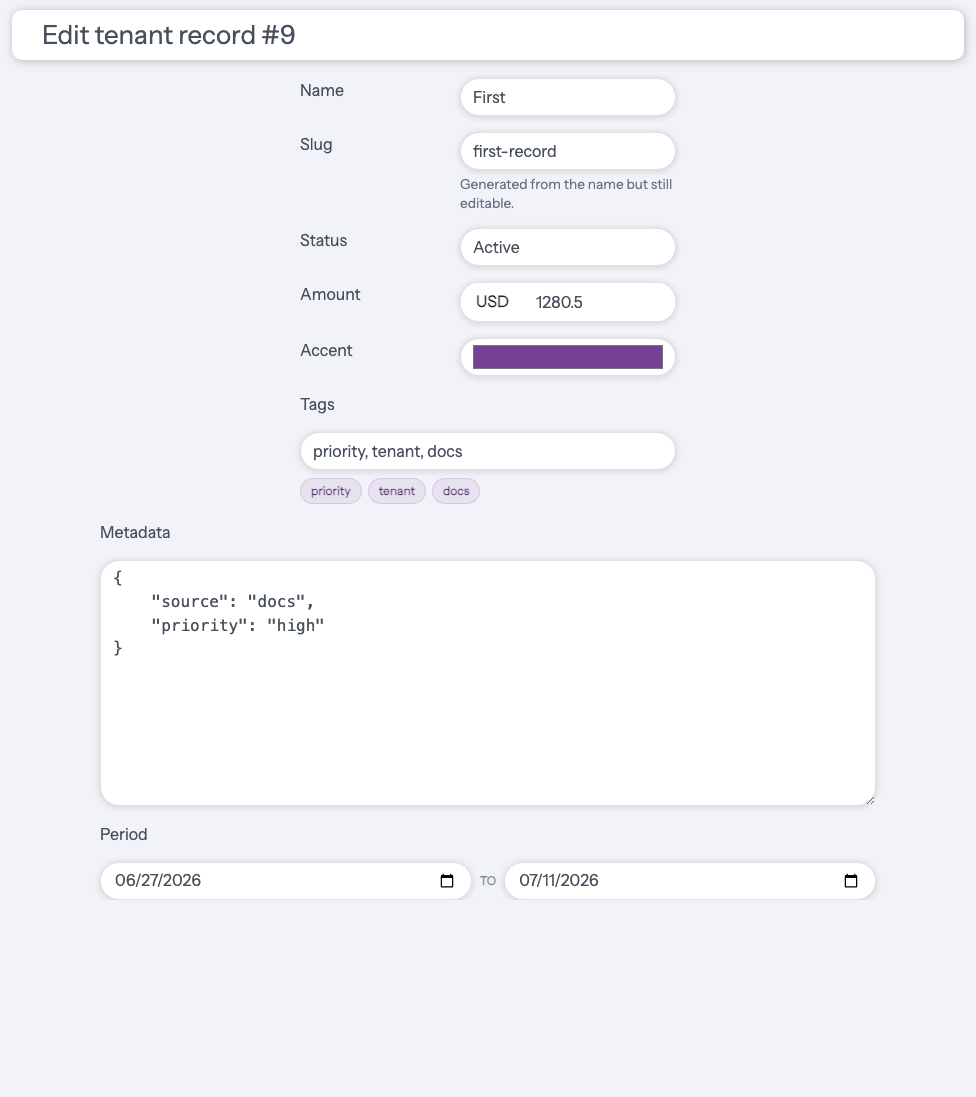
Example: existing record edit form.
Rendered example: