Notifications
Adminix notifications are a typed feedback contract for redirects, JavaScript UI, queued work, and shell notification surfaces. Redirects and normal server-rendered form flows use the same payload shape through session-backed notifications.
DTO contract
NotificationDto fields:
title- optional short heading;body- required message text; provider arrays may usecontentormessageas input aliases;format-text,html, ormd; default istext;severity- semantic level:info,success,warning, orerror;color- optional visual state:green,yellow, orred; when omitted it is derived fromseverity;icon- optional icon class;duration_ms- auto-dismiss duration, clamped to at least1000;persistent- disables auto-dismiss whentrue;actions- optionalNotificationActionDtoentries.
Factory helpers:
NotificationDto::info($body, $title = null);NotificationDto::success($body, $title = null);NotificationDto::warning($body, $title = null);NotificationDto::error($body, $title = null);NotificationDto::fromArray($payload).
Color helpers:
green();yellow();red();withColor('green'|'yellow'|'red');syncColorWithSeverity().
Content format helpers:
asText()escapes the body and can be auto-linked by shell renderers;asMarkdown()/asMd()enables lightweight markdown rendering for links, inline code, bold, italic, and line breaks;asHtml()marks the body as trusted backend HTML.
Only use asHtml() for sanitized or fully server-owned content. content() and withContent() are aliases for body() and withBody() when code reads clearer in stored notification providers.
Action helpers:
NotificationActionDto::link($label, $url, $method = 'GET');NotificationActionDto::named($label, $name);NotificationActionDto::dismiss($label = 'Dismiss').
Action behavior:
URL actions render as links for
GETand small POST forms for non-GET methods in server-rendered notifications.Dismiss actions close the current toast or remove the current bell item from the visible dropdown.
Named actions dispatch a browser
adminix:notification-actionevent with the configured name and payload.
Named actions are a browser integration hook. Do not treat names submitted by the browser as authorization, routing input, tenant context, or proof that a server-side action is allowed.
Session notifications
Adminix flashes typed notifications under the adminix_notifications session key. Each item is the serialized NotificationDto::toArray() payload.
For package redirects that already return feedback, Adminix also keeps the legacy session keys:
message- the notification body;status- the normalized severity.
This keeps existing consuming apps compatible while newer pages can read adminix_notifications. Resource save/create, validation failures, and bulk action redirects now flash the typed notification payload where they already flash feedback.
The page renderer displays title, body, format, severity, color, icon, duration_ms, persistent, and action buttons.
Built-In Response Lifecycle
Adminix emits typed notifications from package-owned flows where feedback already exists:
web resource create/save redirects flash
adminix_notificationsand legacymessage/status;web bulk actions flash typed notifications for success, validation, authorization, and handler errors;
queued bulk action dispatch flashes the queued message immediately, while the queued handler result remains server-side/audit-side unless the consuming app stores a separate provider notification;
modal resource create/save JSON responses include both legacy
messageand a typednotificationpayload;modal validation and controlled API errors return an error
notificationpayload next tocode,message, and field errors.
The modal frontend reads response.notification first and falls back to response.message. This keeps older consumers compatible while giving newer flows severity, icon, duration, persistence, and actions through the same DTO shape.
JavaScript API
Client-side code can trigger the same toast UI without preparing hidden DOM nodes. The API escapes displayed text by assigning text content, not HTML.
Available helpers:
show(payload, options = {});info(body, options = {});success(body, options = {});warning(body, options = {});error(body, options = {}).
Payload fields mirror the DTO where they are meaningful in the browser: title, body, message, format, content_format, severity, color, icon, duration_ms, durationMs, persistent, and actions. duration_ms is clamped to at least 1000; persistent notifications disable auto-hide. Unknown severities become info. Unknown colors are derived from severity. Unknown formats become text. Browser-rendered html uses the body as trusted HTML; keep browser-supplied payloads in text or md.
Handle named notification actions in consuming JavaScript:
Existing internal toastSuccess() and toastError() calls now use this API, so modal saves and validation failures share the same client-side renderer. Modal create/save responses use showAdminixResponseNotification() internally, which displays typed JSON notifications when the backend provides them and falls back to legacy message text otherwise.
Standard Storage
When notification_bell is enabled, Adminix registers the standard notification migration. Run Laravel migrations after enabling the bell to create the adminix_notifications table. The table stores the same NotificationDto contract used by redirects, JSON responses, and JavaScript notifications. The database columns for severity and format are enum-backed by NotificationSeverityEnum and NotificationContentFormatEnum.
NotificationService::add() is the public write path for the standard storage. It accepts a NotificationDto or normalized notification array, plus optional recipient, bell name, metadata, read state, and panel_key. Use the same bell_name as NotificationBell::make($name) when the record should appear in that bell. When panel_key is omitted, Adminix uses the current panel. Pass it explicitly from queue jobs, console commands, or other producers that run outside the intended panel request, especially for non-default panels.
Run php artisan migrate after upgrading to add the panel scope and indexes. Existing rows are assigned to the resolved default panel: the configured default panel, the first configured panel when no key is named default, or the legacy single panel. The standard provider includes panel_key in reads and mark-read updates, so equal bell/recipient values in two panels remain independent. Ordinary keys remain readable in the table; unusually long keys use a deterministic bounded storage digest so strict MySQL/PostgreSQL columns never truncate or merge valid configured panel identifiers. php artisan adminix:doctor --strict reports standard notification storage that is missing the panel column or either panel query index.
Standard storage records carry:
new/read state through
read_at;visual state through
color:green,yellow, orred;date/time through
created_at;content with links through
body;content format through enum values:
text,html, ormd;severity through enum values:
info,success,warning, orerror;optional actions and metadata as JSON.
If notification_bell is disabled, the notification storage migration is not registered. This keeps consuming applications from receiving package tables for a feature they do not use.
Provider Extension
By default, an enabled bell without an explicit provider reads from Adminix standard storage. Applications that need another source can set a NotificationProviderInterface implementation explicitly on the bell.
By default Adminix binds NoopNotificationProvider, which returns an empty result. NotificationProviderResolver can resolve a provider instance, class string, callable, or the container binding and normalizes array results into NotificationResultDto. The shell bell intentionally does not use that global binding as its implicit source: when a NotificationBell has no explicit provider, Adminix uses its standard DatabaseNotificationProvider. Use provider(...) to switch that bell to application-owned storage.
Provider DTOs:
NotificationQueryDto- server-derived panel key, recipient, page, limit, unread flag, and server-side filters;NotificationRecordDto- stored id,NotificationDto,readflag,is_newalias, created timestamp, and metadata;NotificationResultDto- records, page, limit, total, and unread total.
Each custom provider record can carry:
new/read state through
readoris_new;visual state through
color:green,yellow, orred;date/time through
created_ator accepted aliases such asdate_time;content with links through
body,content, ormessage;content format through
format:text,html, ormd.
Canonical record keys are id, notification, read, is_new, created_at, and metadata. Provider arrays also accept direct notification fields plus content/message, new/isNew, and date_time/datetime/createdAt input aliases.
Shell notification bell
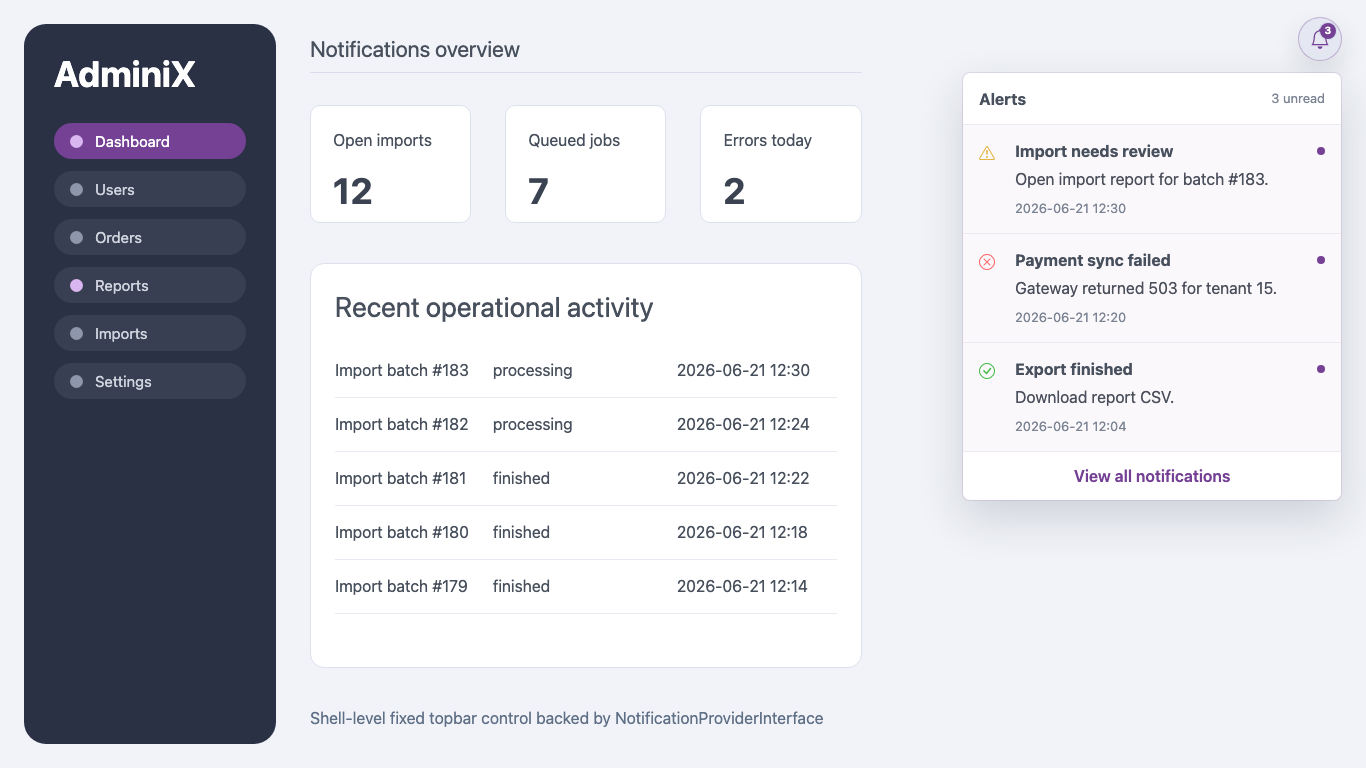
NotificationBell is a shell-level control, not a page module. When enabled it is rendered once in the fixed top bar, on the same layout level as the sidebar, and its dropdown opens above page content. The bell uses the same control size and hover treatment as list settings buttons, with a white icon, and does not reserve a row or add top spacing inside the page content.
Notification dropdown:
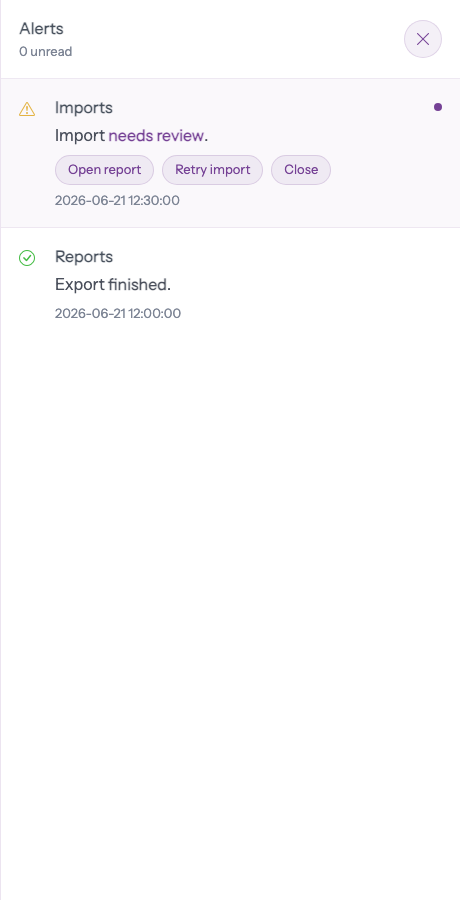
Notification history drawer:
Configure it in config/adminix.php. Do not add it to AdminixPage::addModule() or Module::... factories.
Result: /adminix/users/15 resolves param:0 to 15, builds a server-side NotificationQueryDto, asks the provider for records, and renders unread count plus recent notifications in the fixed Adminix shell topbar without shifting the module grid. The recipient comes from Adminix page params or server config, not from query strings or hidden browser input. The dropdown includes a "View all notifications" control that opens a fixed right-side history drawer above page content. The drawer loads history from the signed bell context, paginates by 25 records, and automatically requests the next page while scrolling. The history surface is a named modal dialog: focus moves into it, Tab stays inside, Escape closes it, and focus returns to the notification bell. Loading, empty, and error states are announced to assistive technology.
Bell DSL:
name()is required and scopes the dropdown DOM id and mark-read route.title()is shown in the button tooltip and dropdown header.icon()defaults to the Bootstrap Icons bell classbi bi-bell.recipient($type, $id)passes recipient context to the provider;$idmay beparam:n.provider()accepts aNotificationProviderInterfaceinstance, class string, or callable.limit()is clamped to1..50.unreadOnly()asks the provider for unread rows only.emptyText()customizes the empty state.viewAllUrl()is retained for backward compatibility, but the built-in UI now opens the history drawer instead of navigating to a separate page.
When the dropdown or history drawer is opened, Adminix sends one POST request per page refresh with the ids of currently rendered unread records. The browser cannot choose recipient context: the request includes a signed notification context generated from the server-side page name, bell name, and route params. For standard storage, Adminix handles this through DatabaseNotificationProvider. If a custom provider should clear unread/new state when notifications are viewed, make the provider also implement NotificationReadMarkerInterface.
If the provider does not implement NotificationReadMarkerInterface, the endpoint returns success without changing storage.
Notification display actions are client-side affordances. Server-side state changes triggered from named actions must still go through app-owned routes, policies, CSRF, and Adminix server-side action resolution.
Security boundaries
Session notifications are display feedback only. Do not use browser-submitted notification payloads as authorization, routing, model lookup, action names, tenant context, or persistence input. Server-side controllers and handlers must still decide what happened and which notification, if any, should be flashed. Database-backed providers must scope rows by the current admin/tenant server-side; do not accept recipient ids or unread filters directly from browser input without authorization. They must also scope both queries and mark-read writes by $query->panelKey(); the browser cannot choose that key. JSON notification payloads returned to the browser are presentation data only. Resource writes, modal writes, bulk actions, queued dispatch, mark-read, and named notification actions still resolve page, module, action, ids, route params, and tenant context from server-side configuration or signed context.