Dashboard
DashboardModule lays out existing Adminix modules in named sections, rows, and responsive columns. It is layout-only: business routes, jobs, validation, persistence, and downloads still belong to the consuming Laravel app.
Use it when a page needs an operational dashboard made from counters, lists, text, links, progress bars, media, or other Adminix modules.
Rendered example:
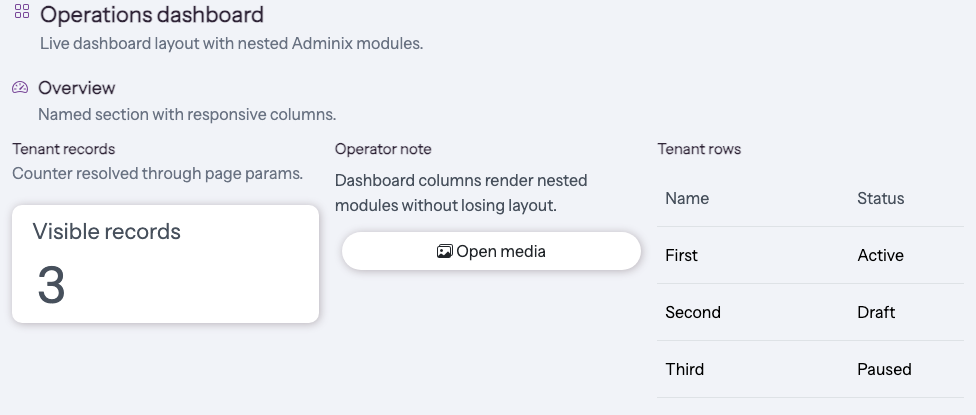
Layout API
Module::dashboard()returns a blank dashboard module.DashboardModule::make($name, $title = null)creates a named dashboard directly.name()is required and must be unique on the page.title(),description(), andicon()render the dashboard header.section($name, $title = null)creates and appends aDashboardSection.DashboardSection::row($name = null)creates and appends a row.DashboardRow::column($name, $span = 12)creates and appends a column.Column spans are clamped to
1..12and map to the Adminix responsive grid.addModule()andaddModules()accept anyAdminixModuleInterfacemodule inside a column.Dashboards are full-width by default;
halfWidth()restores a half-width top-level layout.
Rows and columns are structural. They do not define data sources, writable fields, actions, or routes. Nested modules are resolved through their normal data providers, so route params, criteria, filters, list endpoint lookup, and module-name discovery continue to work.
Doctor And Safety
adminix:doctor walks the complete page module tree, including dashboard sections, rows, columns, and panel children. It reports invalid structure and still checks nested lists, resources, imports, media browsers, tenant switchers, links, and progress bars. Module-name uniqueness and ImportModule progress references are resolved page-wide at every nesting level. An ancestor cycle produces a controlled ADMINIX_MODULE_ANCESTOR_CYCLE error instead of recursive inspection.
Keep tenant/user scoping inside server-side module criteria or a server-owned tenant context provider. Do not accept dashboard section names, data sources, primary keys, writable fields, action names, or param:* values from browser input.
Scope
DashboardModule is not a database-stored admin builder and does not replace PHP-first page configuration. Use it to compose existing runtime-generated modules into a richer page layout. For a single framed block, use PanelModule; for static copy, use TextModule.